2025年4月6日星期日

Fresh Resources for Web Designers and Developers (September 2024)

 It’s September and we’ve got a fresh set of resources for our fellow web developers.

This month, we’ve got tools from various categories, including a plugin to check a WordPress plugin, a React component library for WordPress admin applications, a collection of Laravel Blade components, a static site generator written in Rust, and a few more interesting things that you might find useful.

Let’s just get started!

Plugin Check

Plugin Check is a WordPress tool to help you ensure your plugin meets the standards required for the WordPress.org plugin directory . It checks for compliance with best practices, covering areas like performance, security, i18nA11y, and flagging any violations or concerns to help improve your plugin.

WordPress Plugin Check compliance tool

Kubrick UI

Kubrick UI is an open-source React component library built on top of react-aria, designed for creating custom WordPress admin applications. It helps developers to ensure their WordPress Admin applications are consistent, accessible, and seamlessly blend with the familiar WordPress Admin interface.

Kubrick UI React component library for WordPress admin

React Symbols

react-symbols is a lightweight React library providing over 100 files and folder icons. Built with TypeScript, it supports React Server Components (RSC) and provides optimized, minified SVGs. The icons are originally designed and created for the VSCode theme, Symbols, but I think it’s perfectly good for any project.

React Symbols library icons and folders for VSCode

Zola

Zola is a static site generator (SSG) written in Rust, similar to Hugo and Jekyll, that uses the Tera template engine. It supports CommonMark, and provides features like GitHub-flavored tables and task lists out-of-the-box. A great tool for developers looking to build fast, secure, and flexible websites.

Zola static site generator written in Rust

MaryUI

MaryUI is a collection of Laravel Blade components for Livewire 3. It offers pre-designed UI elements that help Laravel developers quickly and easily build UIs and pages for their apps. It is built using daisyUI and Tailwind CSS for styling, giving you flexible customization with tools you’re already familiar with.

MaryUI Laravel Blade components for Livewire 3

Expressive Code

Expressive Code makes it easy to display code blocks on your content or page. It supports VS Code themes with accurate syntax highlighting, and includes features like editor frames, copy-to-clipboard buttons, text markers, and collapsible sections. Best of all, it doesn’t rely on any front-end frameworks like React or Vue, and works with popular site generators like Astro and Next.js, as well as plain Markdown and MDX.

Expressive Code code block syntax highlighting and editor frames

Shoelace

Shoelace is an open-source, framework-agnostic library of customizable web components. It offers accessible, modern UI elements like buttons and dialogs, with easy theming and integration into any project, making it ideal for building responsive, flexible web interfaces.

Shoelace library of customizable web components

GitHub Copilot Extensions

GitHub has recently announced GitHub Copilot Extensions, that enables developers to develop and deploy using natural language within VS Code and GitHub. It allows you to tap into specific tools, like Docker, Azure, Stripe, and MongoDB, that provide you better tools and context to fix or solve problems within your app in one streamlined process.

GitHub Copilot Extensions for VSCode and development tools

Dioxus

Dioxus is a Rust library that lets you build apps for desktop, web, mobile, and more—all from a single codebase. Inspired by React, it focuses on making development for cross-platform applications faster and easier. A great tool if you’re looking to build apps for multiple platforms.

Dioxus Rust library for cross-platform app development

Motion Primitives

Motion Primitives is a collection of React components built with Framer Motion and Tailwind CSS. It makes it easy for you to add smooth animations to your websites. A perfect library for both developers and designers looking to make websites more alive.

Motion Primitives React components for smooth animations

Rclone

Rclone is a command-line tool that helps you manage files on cloud storage easily. It serves as an alternative to the web interfaces provided by the cloud vendors. It supports over 70 different cloud storage services, including S3 object stores and various file storage options. It makes it easier to transfer and organize your files across multiple platforms.

Rclone command-line tool for cloud file management

Notion Helper

Notion Helper is a Node.js library that simplifies working with the Notion API. It’s easy to use, has no dependencies, and provides full JSDoc support for IntelliSense. An overall great tool for developers looking to integrate Notion into their projects.

Notion Helper Node.js library for Notion API integration

Wagtail

Wagtail is an open-source content management system (CMS) built on Django, designed with a focus on user experience. It provides designers and developers with fine control over content and design. It makes it easy and flexible to create websites. If your Python project is looking for a CMS that is easy to use and customize, I think Wagtail is a great choice.

Wagtail open-source CMS built on Django

UIKit

UIKit is a toolkit designed for building fast, responsive 3D user interfaces using react-three-fiber. It provides pre-styled, customizable components that make it easier for you to create interactive layouts and interfaces. A great library for developing UIs in web-based 3D apps, such as games or virtual/augmented reality (VR/AR) projects.

UIKit toolkit for building 3D user interfaces

SN Pro

SN Pro is a free, open-source typeface based on Nunito. It refines each character for better readability, improving kerning and ligature support, while tweaking specific letters like Q and t. I think it’s a good-looking font for any type of website. It looks clean and feels more polished.

SN Pro free open-source typeface based on Nunito

Image Placeholders

Image Placeholders is a WordPress plugin, part of WordPress’s effort to improve performance. It works by determining and storing the dominant color for newly uploaded images in the media library, and uses it to create a placeholder background of the color on the frontend that would be visible until the related image is loaded.

Image Placeholders WordPress plugin for performance improvement

Atomico

Atomico is a lightweight library for building web components using functions, hooks, and a virtual DOM, similar to React. It is also framework-agnostic, meaning your components will work with libraries like React, Vue, Svelte, or Angular. I think it is a great library for developers looking to build web components that are fast and easy to use.

Atomico lightweight library for building web components

Gutenberg Comment Highlight

Gutenberg Comment Highlight is a VSCode extension that improves readability for WordPress Gutenberg block meta data. It highlights block names starting with wp: as variables and applies basic JSON syntax highlighting to any JSON strings, making comments easier to read than the default greyed-out look of standard HTML comments.

Gutenberg Comment Highlight VSCode extension for better readability

SST

SST is a framework that simplifies building full-stack applications on your own AWS infrastructure. With a single configuration, you can deploy everything your app needs. It supports a wide range of AWS services, including Lambda, API Gateway, and S3, as well as supports popular frameworks like Next.js, Nuxt, Solid, Astro, etc. A really handy tool for deploying your application.

SST framework for building full-stack applications on AWS

Rspack

Rspack is a high-performance JavaScript bundler written in Rust, designed to be a faster alternative to Webpack. It offers fast build performance, Hot Module Replacement (HMR), and full compatibility with Webpack plugins and loaders. Rspack also supports built-in optimizations like tree shaking, and is framework-agnostic, giving developers flexibility with large-scale projects. A great tool for developers looking to improve their build performance in their projects and applications.

Rspack high-performance JavaScript bundler written in Rust

Fresh Resources for Web Designers and Developers (November 2024)

 It’s time for our monthly roundup!

In this edition, we’ve curated a list of new tools and resources for web developers, including a handful of AI-powered tools and app, media downloaders, and code management tools. There’s something here for everyone, from beginners to experienced developers looking to boost productivity.

Without further ado, let’s jump into the full list.

Fresh Resources for Web Designers and Developers (October 2024)

Fresh Resources for Web Designers and Developers (October 2024)

It's time for our monthly roundup! In this edition, we've gathered some exciting new resources for web developers,...Read more

Bolt

Bolt.new is a web-based AI tool that makes building web app prototypes fast and easy. Backed by Anthropic’s Claude 3.5, it allows you to generate code with simple prompts, view live previews, and deploy apps with just one click. It supports frameworks like Next.js, Vue.js, Astro, and many more, with no setup required. It is a perfect tool for creating quick prototypes and basic apps.

Bolt new AI tool for web app prototyping

Cobalt

Cobalt is a web app for downloading videos, audio, and other media from platforms like YouTube, TikTok, and Instagram. Simply paste a link to download. It’s ad-free, private, and easy to use, with no tracking or paywalls. A convenient tool for downloading media.

Cobalt media downloader for YouTube and TikTok

Knip

Knip is a code management tool that helps organize JavaScript and TypeScript projects by identifying and cleaning up unused files, exports, and dependencies. It performs a deep scan tailored to your project’s frameworks and tooling for accurate results. Knip makes your codebase cleaner and simplifies project maintenance.

Knip code management tool for JavaScript and TypeScript

Wave

Wave is a free, open-source platform for launching Software as a Service (SaaS) products. Built with Laravel, it includes essential features like billing, subscriptions, user profiles, and notifications. It’s a solid starting point for developers creating SaaS products.

Wave platform for launching SaaS products

OpenInterpreter

OpenInterpreter lets you execute LLMs directly on your computer using its CLI tool. Features include a natural language interface, local code execution, vision capabilities, customizable profiles, and integration with various LLMs. A useful tool for enhancing your computer interactions.

OpenInterpreter CLI tool for running LLMs locally

Perplexity

Perplexity.ai is an AI-powered search engine that provides direct, concise answers to queries. It redefines how people find and use information online. A useful alternative search engine for students, researchers, or anyone seeking quick answers.

Perplexity AI-powered search engine

Zen Browser

Zen Browser is a customizable, privacy-focused web browser built on Firefox. It offers features like vertical tabs, split views, and workspaces, with a sleek, personalized interface. It’s an open-source, community-driven alternative to mainstream browsers.

Zen Browser privacy-focused alternative
10+ Private Search Engines That Don’t Track You

10+ Private Search Engines That Don’t Track You

Private browsing using the supposedly private or incognito modes on your regular browser does not give you the...Read more

Yaak

Yaak is an open-source desktop app for managing APIs like REST, GraphQL, and gRPC. It includes multi-environment support, variable management, and import capabilities from tools like Postman. A simple yet powerful API client for developers.

Yaak desktop app for managing APIs

AI Chatbot

This is a template provided by Vercel for developing and deploying AI-powered chat applications. It automates workflows with GitHub Actions, supports cross-platform development, and offers features like matrix builds, language support, live logging, and secret management. If you’re looking to build a chatbot, this template is an excellent starting point.
Vercel AI chatbot template overview

Chonkie

Chonkie is a lightweight and efficient chunking library designed for text-based AI applications. It is small, fast, and offers developers various chunking methods like token, word, sentence, and semantic-based chunking, making it a convenient choice for implementing text segmentation without the overhead of heavier alternatives. If you’re working on text-based AI projects, Chonkie is worth exploring.
Chonkie chunking library example

TxtAI

txtai is an all-in-one embeddings database that enables semantic search, language model orchestration, and advanced data processing workflows. It supports vector search using SQL, multimodal embedding creation, and LLM-powered pipelines for tasks like question-answering and summarization. If you’re looking for a powerful tool to enhance your text-based AI projects, txtai is an excellent choice.

txtai AI-powered database features

Superfile

Superfile is a Terminal-based file manager that balances clean design with powerful file management features. It includes customizable options like hotkeys, theme colors, and border styles to fit your preferences. It supports multiple panels, allowing you to open multiple directories simultaneously, making it easier to organize and move files without constantly switching views. A great tool for Terminal power-users.

Superfile Terminal-based file manager interface

Bark

Bark is an open-source AI tool by Suno that creates lifelike speech, music, and sound effects from text. It supports multiple languages and adds realistic nonverbal sounds like laughter. It’s a great tool for generating audio content for various applications, from podcasts to video games.

Bark AI text-to-audio synthesis features

Morphic

Morphic is an AI-powered search engine built to improve user search with an advanced, generative interface. Built on top of the Vercel AI SDK RSC, it offers features like search history and support for multiple AI providers, including OpenAI, Gemini, and more. It can also search video content and retrieve answers from specific URLs. Overall, it is a great alternative to traditional search engines.

Morphic AI search engine interface

Harper

Harper is a lightweight, privacy-focused English grammar checker built for developers. It processes everything locally to ensure privacy and currently supports American English, with plans for additional languages through community contributions. You can integrate Harper into your environment using harper-ls, an Obsidian plugin, or a Zed plugin. A great tool for developers looking to improve their writing.

Harper English grammar checker overview

GitHub Resume Generator

GitHub Resume Generator allows you to create professional resumes. By connecting your GitHub account, it can automatically pull details like repositories, contributions, and skills. It also provides built-in templates and customization options, so you can tailor your resume to fit your style and needs. It’s a simple tool for creating resumes directly from GitHub.

GitHub Resume Generator interface example

LlamaOCR

LlamaOCR is an open-source Optical Character Recognition (OCR) tool that converts document images into structured Markdown format, ideal for handling complex layouts like tables and mixed-format files. It uses the Llama 3.2 Vision model to reliably extract text from PDFs and images. It’s easy to integrate via the npm package. If you’re looking for a powerful OCR tool, LlamaOCR is an excellent choice.

LlamaOCR OCR capabilities example

Generative AI for Beginners

Generative AI for Beginners by Microsoft is an open, beginner-friendly educational resource covering key concepts and applications in generative AI. It includes learning materials, an active community for discussions, and ongoing contributions. It is one of the best resources for those looking to get started with generative AI.

Generative AI for Beginners educational content overview

Prompt Engineering Guide

The Prompt Engineering Guide is a comprehensive resource for mastering prompt crafting for AI and machine learning applications. It provides best practices, practical examples, and detailed documentation to help you create prompts that yield accurate and effective AI responses. This guide is a collaborative project, with contributions from developers and researchers to continually improve prompt engineering techniques. A valuable resource if you’re looking to improve your prompt engineering skills.

Prompt Engineering Guide documentation overview

AI Gateway

AI Gateway by Portkey AI is a lightweight Python library that allows you to access over 250 AI models through a single API. It provides efficient request routing, load balancing, and fallback mechanisms while supporting major AI providers like OpenAI, Google Gemini, Anthropic, and more. A great library to simplify AI model access and management.

AI Gateway Python library interface example

How to Publish Website on Github Pages in Three Simple Steps

 Github Pages offers a valuable service by allowing you to host a static website directly from a Git repository. It’s an ideal platform for solo developers to showcase portfolios, support open-source projects, or disseminate information about educational institutions or organizations.

Many prominent projects utilize Github Pages for hosting, including well-known ones like BootstrapNormalizeCSS, and Yelp.

This tutorial will walk you through the steps to create and publish a straightforward site using Github Pages. It is assumed that you have a basic understanding of Git and its commands, such as how to create and push commits to a remote repository. If not, I recommend checking out our guide: 30 Basic Git Commands You Should Know.

Let’s get started!

Step 1: Create a Repository

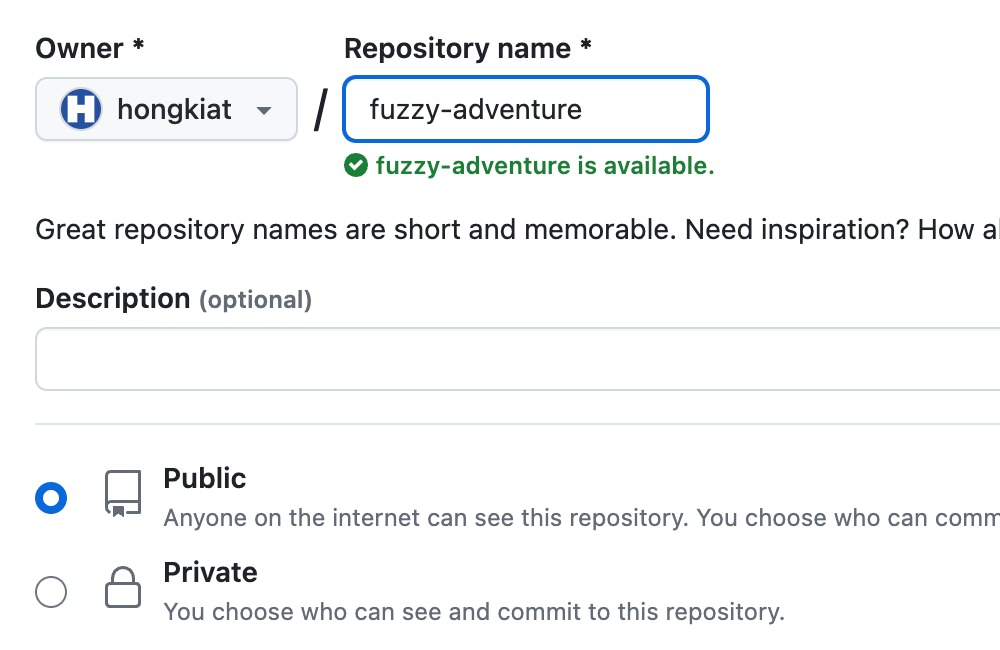
First, you need a Github account to create a repository. You can name the repository anything you like; there are no specific naming requirements.

Creating a new repository on Github

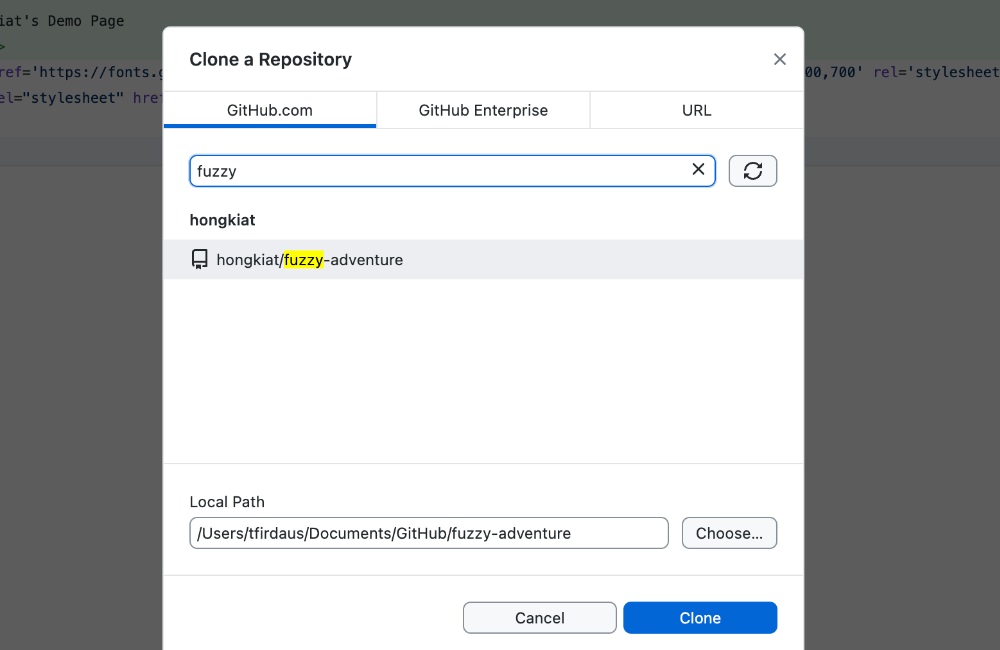
After creating the repository, the next step is to clone it to your local computer. If you have the Github Desktop application installed, you can easily accomplish this by going to File > Clone Repository within the application.

Cloning a repository using Github Desktop

Alternatively, you can clone the repository using the git command-line interface (CLI), for example:

git clone https://github.com/hongkiat/fuzzy-adventure.git

Step 2: Create the Main Page

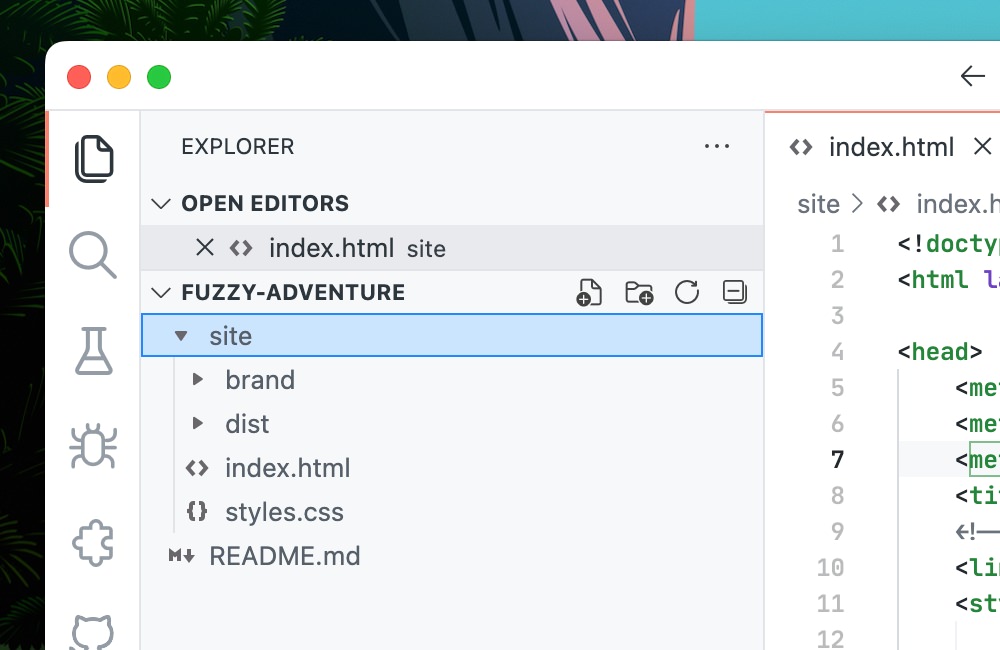
To set up a homepage, Github primarily looks for a file named index.html. It can also utilize index.md or README.md. This file can be placed at the root of your repository or within a subdirectory to separate your site from the main source code—commonly in the docs or site directory.

In this example, I’ll demonstrate adding an index.html file in the docs directory, supplemented with styles and scripts from Bootstrap.

Adding files to the docs directory

With the files in place, we can now add and push them to the Github repository.

Step 3: Configure Page Deployment

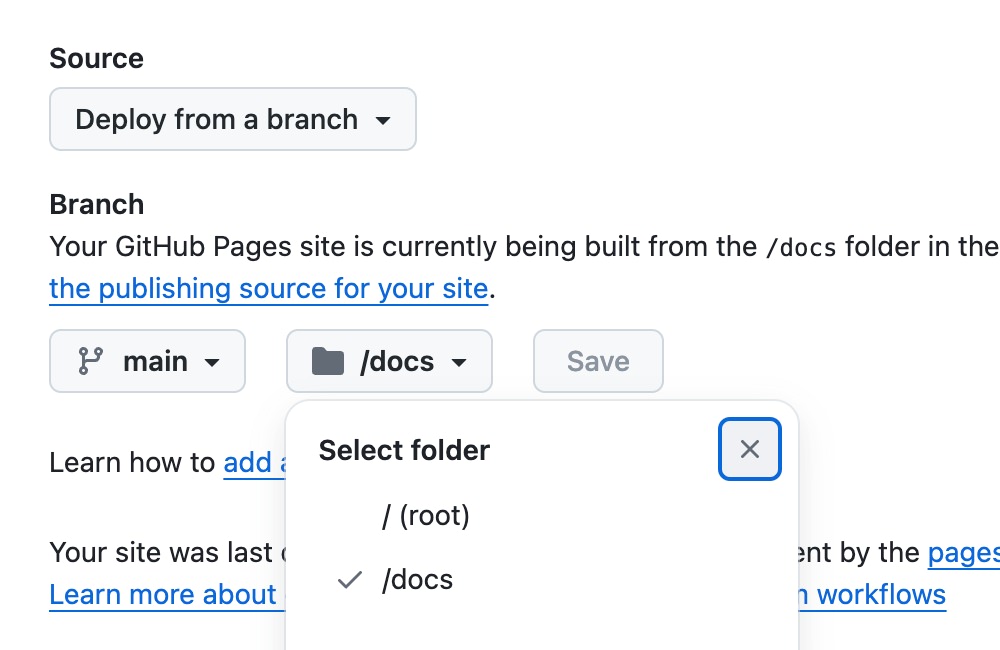
In your Github repository, navigate to Settings > Pages. Here, select the source you wish to deploy as Github Pages. Since we’ve placed the index.html file in the docs directory, choose the appropriate branch and set the directory to /docs under the “Build and deployment” section.

Configuring build and deployment settings

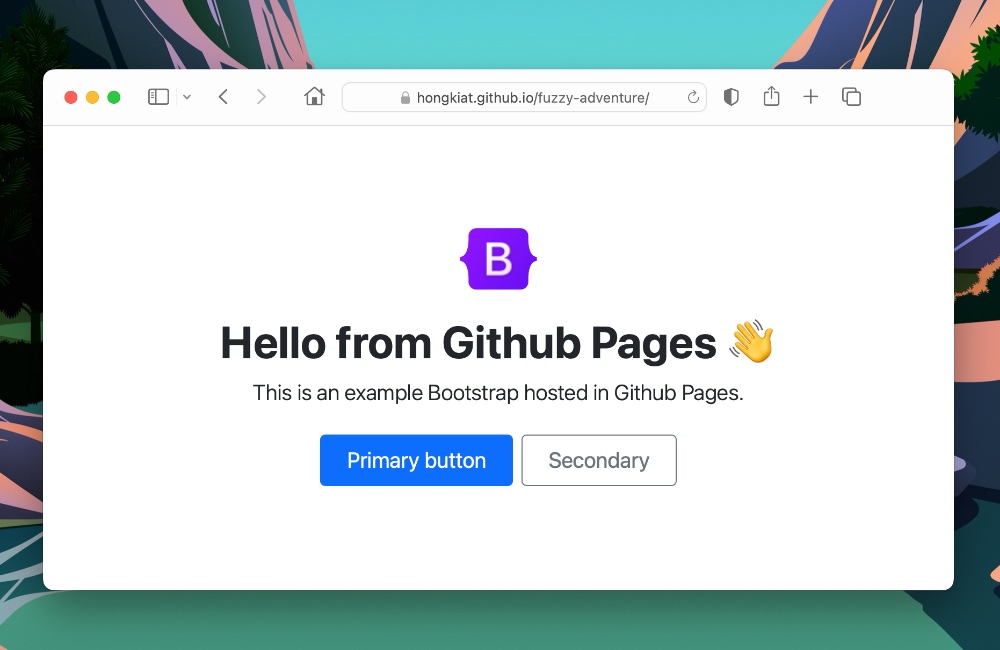
That completes the setup for your Github Pages site. The site will be accessible through a URL pattern provided by Github. For example, if your repository is at github.com/hongkiat/fuzzy-adventure, then your Github Pages site will be at hongkiat.github.io/fuzzy-adventure.

Preview of the Github Pages site

Bonus: Using a Custom Domain

Using a custom domain for your Github Pages site provides a personalized URL that’s easier to remember and enhances your site’s branding. Here’s how to set it up.

Step 1: Add DNS Record

To begin, add a DNS record to link your custom domain to Github Pages. For instance, if you want to use fuzzy-adventure.hongkiat.net, you’ll need to create a CNAME record in your domain’s DNS manager that points to hongkiat.github.io.

If you’re unsure where to find your DNS manager or how to add a new DNS entry, please contact your domain registrar for assistance.

Step 2: Wait for Domain Propagation

After setting the DNS record, it takes some time for the changes to propagate, which can vary from a few minutes to 24 hours. You can monitor with DNS propagation tools like WhatsMyDNS or by using the command below:

dig fuzzy-adventure.github.io +nostats +nocomments +nocmd

Once the DNS propagation is confirmed, you might see results similar to this:

Results of DNS propagation check for custom domain
Step 3: Add Domain to Repository

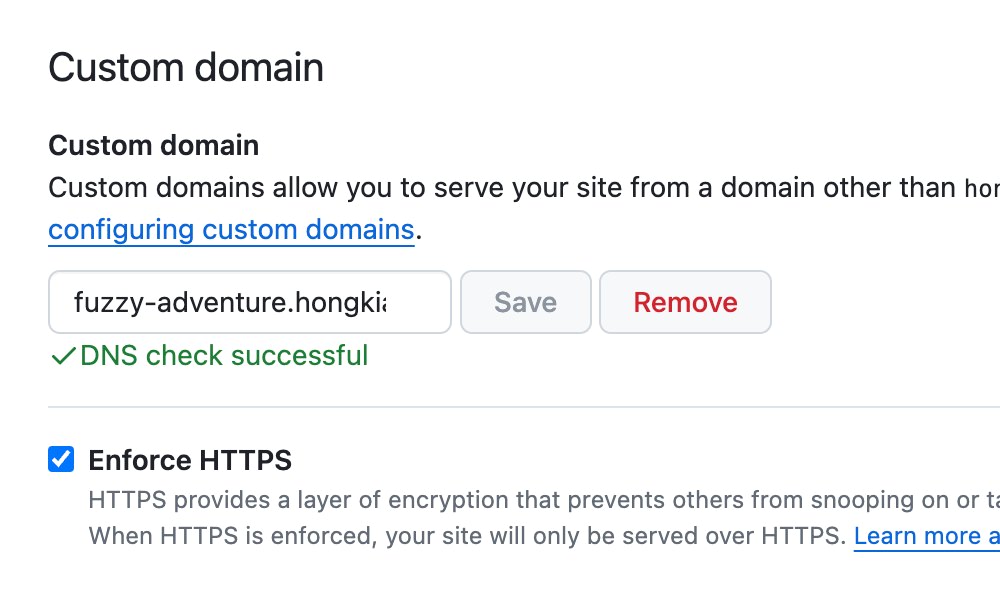
After DNS propagation completes, inform Github about your custom domain. Go to your repository’s Settings, head to the Pages section, and enter your custom domain in the Custom Domain field. Github will verify the domain and set it up. Once verified, you can also secure your site by enabling the “Enforce HTTPS” option.

Verifying custom domain in Github repository settings

Now your Github Pages site should be accessible via your custom domain!

Fresh Resources for Web Designers and Developers (September 2024)

  It’s September and we’ve got a fresh set of resources for our fellow web developers. This month, we’ve got tools from various categories, ...